
Webhook Setup & Troubleshooting
GateFuz provides dedicated REST API endpoints for every supported payment gateway under the namespace gatefuz/v1/webhook/.
Webhook Endpoint URLs
Section titled “Webhook Endpoint URLs”GateFuz automatically generates and displays your complete list of registered webhook endpoints and active event filters in GateFuz → Status & Logs → Gateway Webhook Listeners:
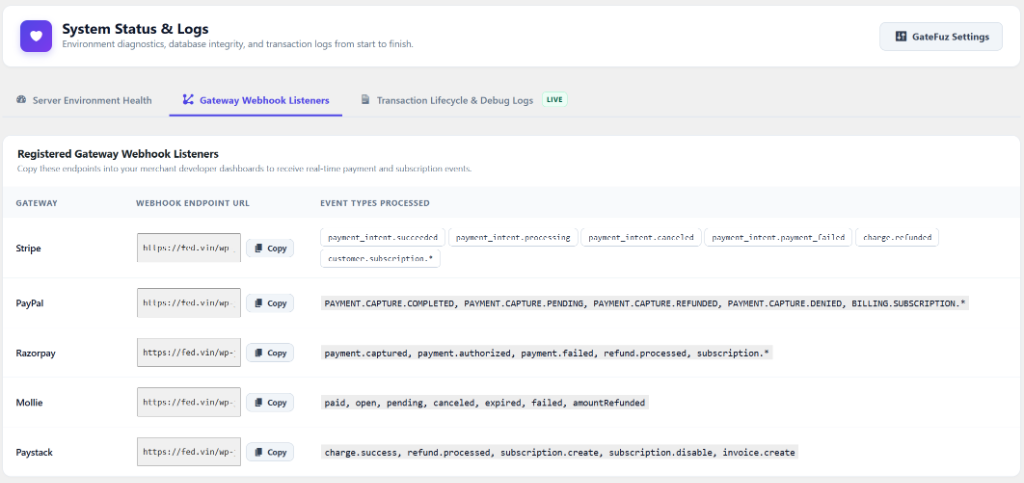
| Gateway | Webhook Endpoint URL |
|---|---|
| Stripe | https://yourdomain.com/wp-json/gatefuz/v1/webhook/stripe |
| PayPal | https://yourdomain.com/wp-json/gatefuz/v1/webhook/paypal |
| Razorpay | https://yourdomain.com/wp-json/gatefuz/v1/webhook/razorpay |
| Mollie | https://yourdomain.com/wp-json/gatefuz/v1/webhook/mollie |
| Paystack | https://yourdomain.com/wp-json/gatefuz/v1/webhook/paystack |
| Braintree | https://yourdomain.com/wp-json/gatefuz/v1/webhook/braintree |
Testing Webhooks in Local Development
Section titled “Testing Webhooks in Local Development”Payment gateways require publicly accessible HTTPS URLs to send webhook notifications. In local environments (such as LocalWP, XAMPP, or Docker):
- Use a tunneling tool such as ngrok or Cloudflare Tunnel:
Terminal window ngrok http 80 - Copy the generated HTTPS forwarding URL (e.g.
https://random-id.ngrok-free.app). - Set your webhook destination in your payment provider dashboard to:
https://random-id.ngrok-free.app/wp-json/gatefuz/v1/webhook/stripe
- Verify incoming requests live under GateFuz → Status & Logs → Transaction Logs.