
Transactions Ledger Management
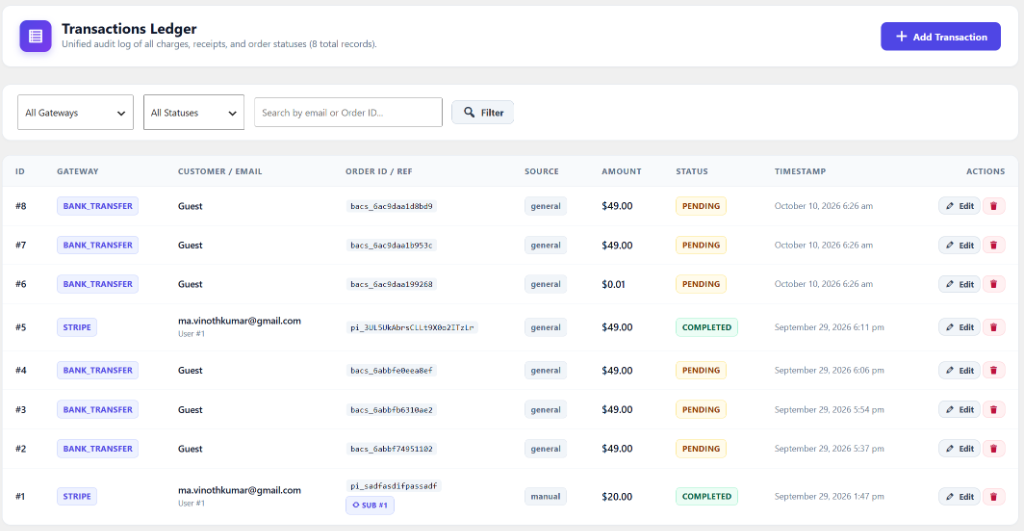
GateFuz maintains a unified transaction ledger (wp_gatefuz_transactions) that logs every payment attempt, authorization, completion, refund, and customer details.
Viewing & Filtering Transactions
Section titled “Viewing & Filtering Transactions”Navigate to GateFuz → Transactions:
- Real-time Filters: Filter by Gateway (Stripe, PayPal, Razorpay, etc.) or Status (Completed, Pending, Failed, Refunded).
- Live Search: Search instantly by Order ID, Customer Email, or Gateway Transaction ID (
pi_...,ch_...,BT-...). - Linked Subscriptions: Transactions linked to recurring subscriptions display the associated Subscription ID.
Transaction Lifecycle Statuses
Section titled “Transaction Lifecycle Statuses”| Status | Meaning |
|---|---|
completed |
Payment was confirmed and captured; fulfillment hook gatefuz_payment_completed was triggered. |
pending |
Waiting for offline transfer (BACS) or asynchronous payment authorization (3D Secure). |
refunded |
Payment was refunded back to customer; synchronized automatically via provider webhook. |
failed |
Declined by bank, invalid card details, or amount/currency mismatch flagged. |
cancelled |
Explicitly cancelled by customer before completion. |
Adding or Editing Transactions Manually
Section titled “Adding or Editing Transactions Manually”Site administrators can create or adjust manual records:
- Click Add Transaction in the top right.
- Enter Gateway, Amount, Currency, Status, Customer Email, and Order Reference.
- Optionally link to an active customer Subscription record.
- Save to add the record to the immutable audit ledger.