
PayPal Complete Payments Setup
GateFuz connects with PayPal using the official PayPal REST v2 Orders and Subscriptions API with cryptographic webhook validation.
Gateway Configuration Console
Section titled “Gateway Configuration Console”Navigate to GateFuz → Gateways → PayPal to configure Smart Payment Buttons, dual-key credentials, and isolated Webhook IDs:
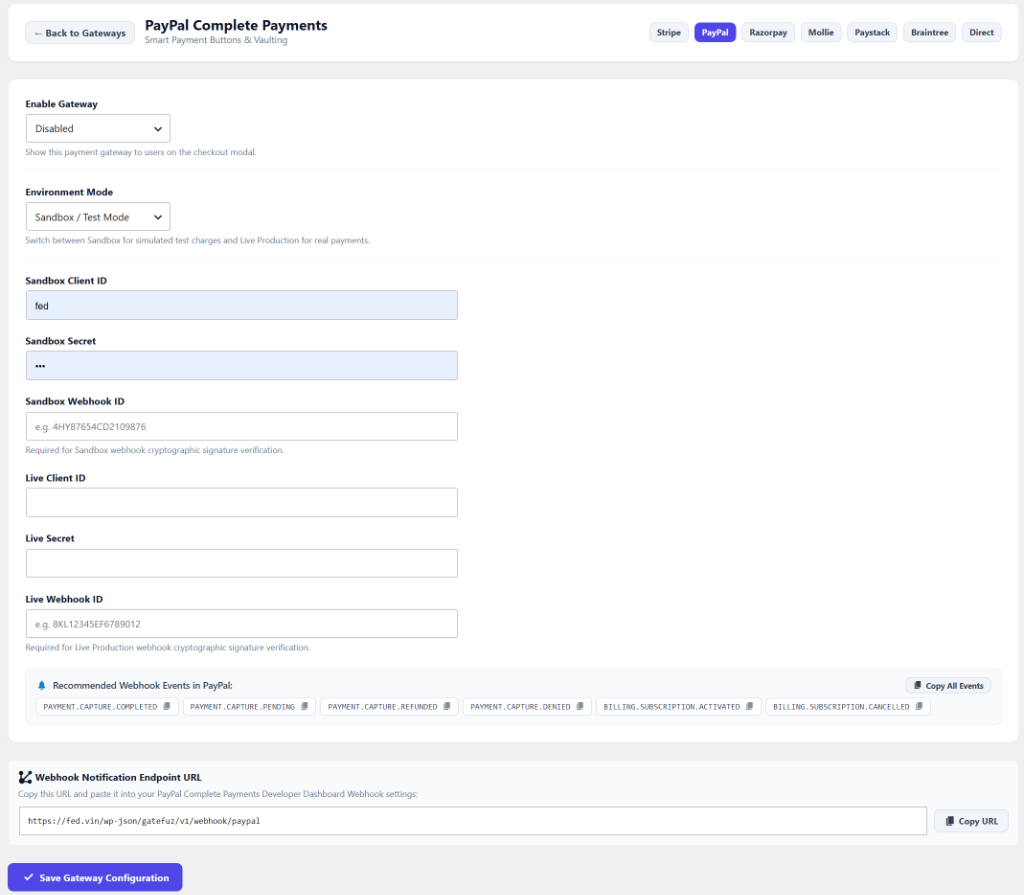
Configuration Fields
Section titled “Configuration Fields”| Setting | Type | Description |
|---|---|---|
| Enable Gateway | Select | Toggle whether PayPal buttons appear in the checkout modal. |
| Environment Mode | Select | Switch between Sandbox / Test Mode and Live Production. |
| Sandbox Client ID | String | Developer Sandbox App client ID. |
| Sandbox Secret | Password | Developer Sandbox App secret key. |
| Sandbox Webhook ID | String | Alphanumeric webhook ID generated in PayPal Developer Dashboard for Sandbox webhook verification. |
| Live Client ID | String | Production PayPal Live client ID. |
| Live Secret | Password | Production PayPal Live secret key. |
| Live Webhook ID | String | Alphanumeric webhook ID generated in PayPal Live Dashboard for production verification. |
Retrieving PayPal Credentials
Section titled “Retrieving PayPal Credentials”- Log in to the PayPal Developer Dashboard.
- Navigate to Apps & Credentials.
- Under REST API apps, select your app (or click Create App).
- Copy your Client ID and Secret Key.
- Switch between Sandbox and Live tabs to retrieve credentials for both modes.
- In WordPress, go to GateFuz → Gateways → PayPal and enter your credentials.
Configuring Webhooks & Webhook ID
Section titled “Configuring Webhooks & Webhook ID”- In the PayPal Developer Dashboard under your app details, click Add Webhook.
- Enter your GateFuz PayPal Webhook URL:
https://example.com/wp-json/gatefuz/v1/webhook/paypal
- Check the recommended events:
PAYMENT.CAPTURE.COMPLETEDPAYMENT.CAPTURE.PENDINGPAYMENT.CAPTURE.REFUNDEDPAYMENT.CAPTURE.DENIEDBILLING.SUBSCRIPTION.ACTIVATEDBILLING.SUBSCRIPTION.CANCELLED
- Save the webhook. PayPal will generate a Webhook ID (e.g.
4HY87654CD2109876). - Copy this Webhook ID into GateFuz → Gateways → PayPal → Webhook ID (Sandbox and Live fields available).