
Embedding Checkout: Gutenberg Block & Shortcodes
GateFuz provides flexible ways to render responsive, payment-ready checkout forms across your WordPress site.
Option 1: The Gutenberg Block
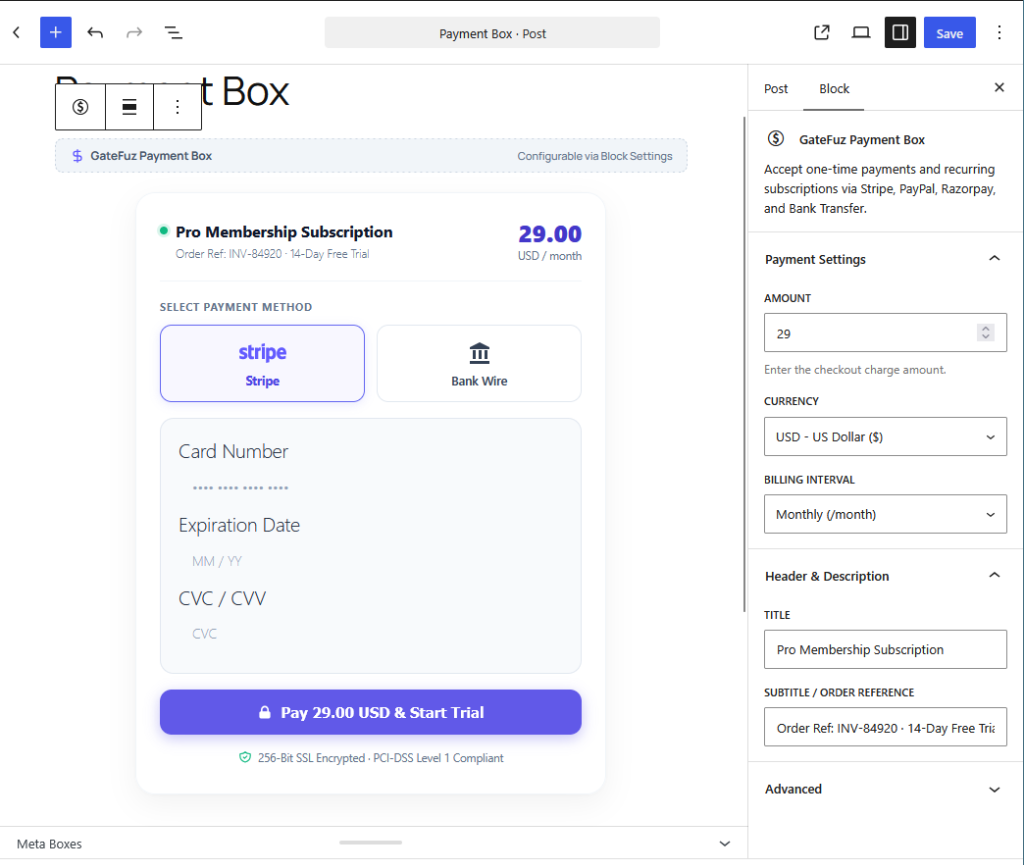
Section titled “Option 1: The Gutenberg Block”GateFuz includes a dedicated Block Editor component: GateFuz Payment Box (gatefuz/checkout).
- Open the WordPress Block Editor (Gutenberg) on any Page or Post.
- Click Add Block (+) and search for
GateFuz Payment Box. - In the right-hand Block Settings Sidebar, configure:
- Amount: Payment total (e.g.
29.00). - Currency: ISO 3-letter currency code (e.g.
USD,EUR,INR). - Billing Interval: One-time or recurring interval (e.g.
Monthly (/month)). - Title & Description: Header and subtitle / order reference (e.g.
INV-84920 · 14-Day Free Trial).
- Amount: Payment total (e.g.
- Publish or update your page. The block renders a live interactive preview inside the editor with card fields and gateway selector.
Option 2: The WordPress Shortcode
Section titled “Option 2: The WordPress Shortcode”You can embed the payment box anywhere shortcodes are supported using [gatefuz_checkout]:
[gatefuz_checkout amount="49.00" currency="USD" title="Order Payment"][gatefuz_checkout amount="99.00" currency="EUR" order_id="INV-2026-001" title="Invoice Payment"]Shortcode Attributes Reference
Section titled “Shortcode Attributes Reference”| Attribute | Type | Default | Description |
|---|---|---|---|
amount |
float |
0.00 |
The charge amount. |
currency |
string |
Site Default | 3-letter currency code (e.g. USD, EUR, GBP). |
order_id |
string |
Auto-generated | Reference ID attached to the transaction record. |
title |
string |
Checkout |
Heading rendered at the top of the payment box. |
description |
string |
Optional | Subtitle or line item description. |
Option 3: Programmatic PHP Hook
Section titled “Option 3: Programmatic PHP Hook”For theme developers or custom plugins, trigger the checkout rendering directly via PHP:
do_action( 'gatefuz_render_checkout', 49.00, 'USD', [ 'order_id' => 'CUSTOM_123', 'title' => 'Membership Upgrade', 'description' => 'Annual VIP Subscription',] );