
Braintree by PayPal Setup
GateFuz connects with Braintree by PayPal to deliver enterprise credit card processing, vaulted payment methods, and frictionless 3D Secure 2.0 fraud defenses with full PayPal ecosystem interoperability.
Gateway Configuration Console
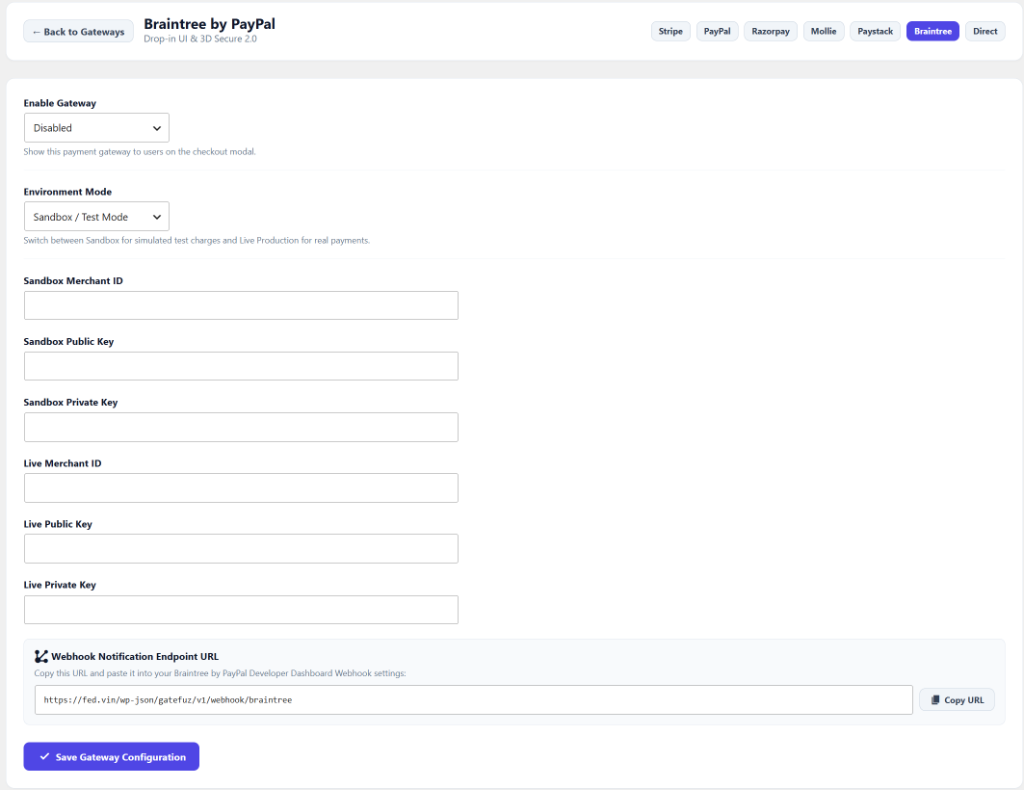
Section titled “Gateway Configuration Console”Navigate to GateFuz → Gateways → Braintree:
Configuration Fields
Section titled “Configuration Fields”| Setting | Type | Description |
|---|---|---|
| Enable Gateway | Select | Toggle whether Braintree appears in the checkout modal. |
| Environment Mode | Select | Switch between Sandbox / Test Mode and Live Production. |
| Sandbox Merchant ID | String | Alphanumeric Braintree Sandbox Merchant Account ID. |
| Sandbox Public Key | String | Braintree Sandbox API Public Key. |
| Sandbox Private Key | Password | Braintree Sandbox API Private Key. |
| Live Merchant ID | String | Braintree Production Merchant Account ID. |
| Live Public Key | String | Braintree Production API Public Key. |
| Live Private Key | Password | Braintree Production API Private Key. |
| Webhook Notification Endpoint | Readonly | Endpoint URL provided in Braintree control panel for real-time status callbacks. |
Retrieving Braintree Credentials
Section titled “Retrieving Braintree Credentials”- Log in to your Braintree Control Panel (or Sandbox Control Panel).
- Navigate to Settings (Gear Icon) → API.
- Under API Keys, locate your Public Key and click View to reveal your Private Key and Merchant ID.
- In your WordPress administration panel, navigate to GateFuz → Gateways → Braintree.
- Paste credentials into the respective Sandbox and Live fields.
Webhook Verification
Section titled “Webhook Verification”Configure the GateFuz webhook endpoint in Braintree under Settings → Webhooks:
https://example.com/wp-json/gatefuz/v1/webhook/braintreeGateFuz automatically verifies the bt_signature and bt_payload using Braintree’s public/private key cryptographic digest algorithm.