
Mollie Payments Europe Setup
GateFuz connects with Mollie Payments Europe to deliver localized payment methods across the European Union, including iDEAL, Bancontact, SEPA Direct Debit, and credit/debit cards with transparent pricing and zero monthly lock-in fees.
Gateway Configuration Console
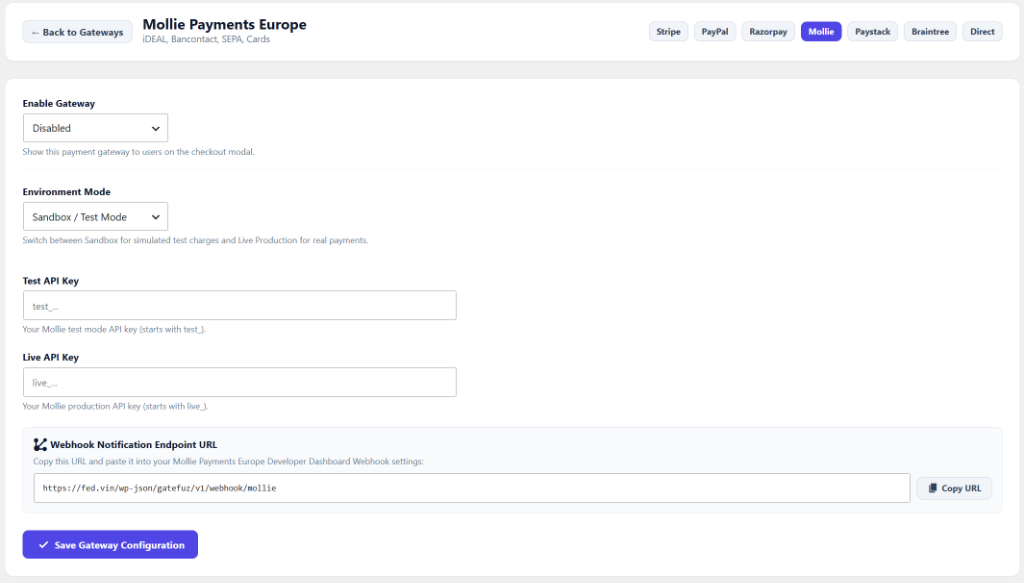
Section titled “Gateway Configuration Console”Navigate to GateFuz → Gateways → Mollie to configure your API keys and webhook endpoints:
Configuration Fields
Section titled “Configuration Fields”| Setting | Type | Description |
|---|---|---|
| Enable Gateway | Select | Toggle whether Mollie appears in the checkout modal. |
| Environment Mode | Select | Switch between Sandbox / Test Mode and Live Production. |
| Test API Key | Password | Mollie test mode API key (starts with test_...). |
| Live API Key | Password | Mollie production API key (starts with live_...). |
| Webhook Notification Endpoint | Readonly | Endpoint URL provided to Mollie for server-to-server status calls. |
Retrieving Mollie API Keys
Section titled “Retrieving Mollie API Keys”- Log in to your Mollie Dashboard.
- Go to Developers → API keys.
- Copy your Test API Key (
test_...) and Live API Key (live_...). - In your WordPress admin, navigate to GateFuz → Gateways → Mollie.
- Paste both keys into their respective fields.
Webhook Verification Architecture
Section titled “Webhook Verification Architecture”Unlike HMAC webhook systems, Mollie issues a secure server-to-server notification sending the id of the transaction (e.g. tr_...). GateFuz receives this notification, makes an authenticated query back to the Mollie REST API using your secret API key, and validates:
- Payment Status: Captures
paid,open,pending,failed,expired, orcanceled. - Amount & Currency: Validates against the original order parameters.
- Refund Events: Detects
amountRefundedand updates the transaction status torefundedviamarkAsRefunded().