
Direct Bank Transfer (BACS) Setup
GateFuz includes native support for Direct Bank Transfer (BACS), enabling merchants to accept offline bank wires, invoice transfers, and local electronic deposits worldwide without third-party gateway transaction fees.
Gateway Configuration Console
Section titled “Gateway Configuration Console”Navigate to GateFuz → Gateways → Direct Bank Transfer:
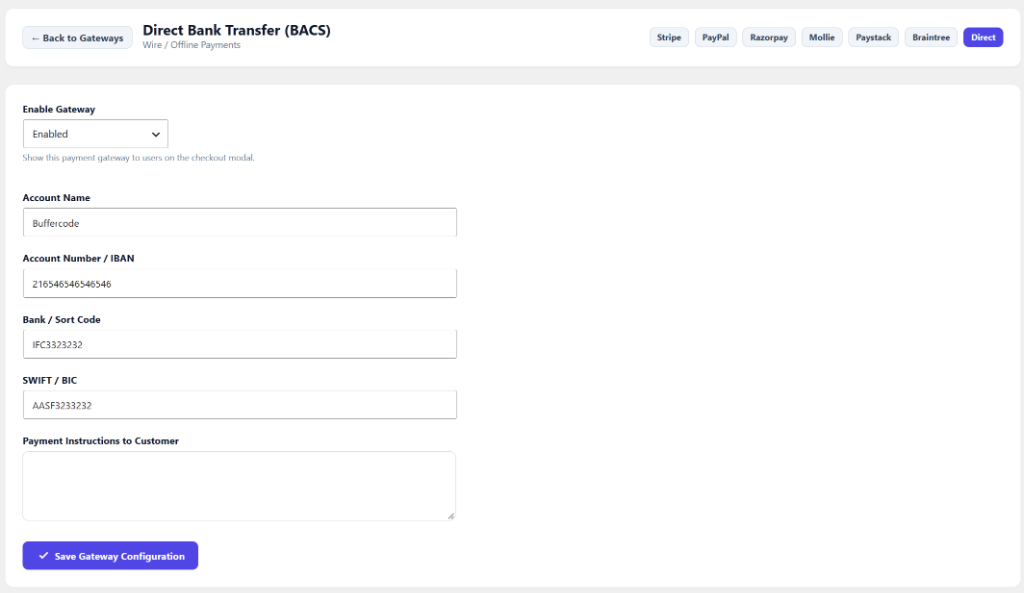
Configuration Fields
Section titled “Configuration Fields”| Setting | Type | Description |
|---|---|---|
| Enable Gateway | Select | Toggle whether Direct Bank Transfer appears in the checkout modal. |
| Account Name | String | Beneficiary business name or account holder name (e.g. Buffercode). |
| Account Number / IBAN | String | International Bank Account Number (IBAN) or domestic checking account number. |
| Bank / Sort Code | String | Routing number, Sort code, or IFSC code (e.g. IFSC3323232). |
| SWIFT / BIC | String | SWIFT or BIC identifier for international cross-border wire transfers. |
| Payment Instructions | Textarea | Custom message presented to the customer with wire instructions and order reference details. |
Transaction Lifecycle for Bank Wire Payments
Section titled “Transaction Lifecycle for Bank Wire Payments”- Order Creation: When a customer selects Bank Transfer at checkout, GateFuz provisions a transaction entry in
wp_gatefuz_transactionswith statuspending. - Customer Wire Submission: The customer receives your bank details and uses their banking portal to dispatch funds referencing the Order ID.
- Manual Settlement: Once funds arrive in your business bank account, go to GateFuz → Transactions, find the matching reference, and click Edit → change status to
completed. - Fulfillment Trigger: Marking the order
completedautomatically fires the standardgatefuz_payment_completedaction hook to grant memberships or fulfill downloads.