Getting Started with GateFuz
GateFuz is an enterprise, decoupled payment gateway engine and unified transaction ledger for WordPress. It operates 100% autonomously with zero required foreign dependencies (such as WooCommerce).
Architecture Highlights
Section titled “Architecture Highlights”- Decoupled Engine: Works with any theme, page builder, Gutenberg, or standalone custom post type.
- Dual Key Credentials: Isolated Sandbox and Live Production keys for Stripe, PayPal, Razorpay, Mollie, Paystack, and Braintree.
- Unified Ledger: Central database tables for transactions (
wp_gatefuz_transactions) and subscriptions (wp_gatefuz_subscriptions). - Cryptographic Security: Strict webhook signature validation (HMAC-SHA256, SHA512, and certificate verification) plus client-side checkout amount HMAC hashing.
Installation & Setup
Section titled “Installation & Setup”-
Activate the Plugin Ensure GateFuz is installed and active under Plugins → Installed Plugins in your WordPress administration dashboard.
-
Verify Database Tables Upon activation, GateFuz creates its two high-performance tables. Check GateFuz → Status & Logs → Health Diagnostics to ensure
wp_gatefuz_transactionsandwp_gatefuz_subscriptionsare active. -
Configure Your Gateways Navigate to GateFuz → Gateways to input your API credentials and select whether each gateway should operate in Sandbox or Live mode.
-
Deploy Checkout UI Add the GateFuz Payment Box Gutenberg block to any page, or embed the shortcode
[gatefuz_checkout amount="49.00" currency="USD"].
GateFuz Central Dashboard
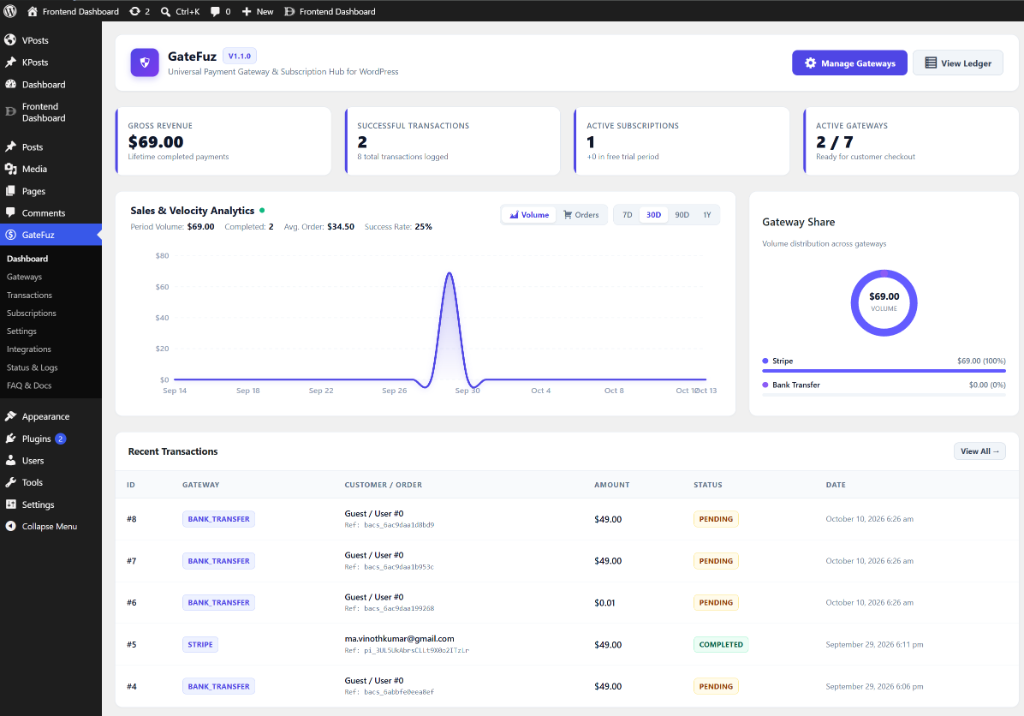
Section titled “GateFuz Central Dashboard”Once installed, GateFuz provides an all-in-one administration command center displaying real-time financial telemetry, sales velocity analytics, gateway volume distribution, and recent transactions: