
Paystack Payments Setup
GateFuz connects with Paystack to enable modern, frictionless online transactions across African markets and international merchants with turnkey support for cards, mobile money, and direct bank transfers.
Gateway Configuration Console
Section titled “Gateway Configuration Console”Navigate to GateFuz → Gateways → Paystack:
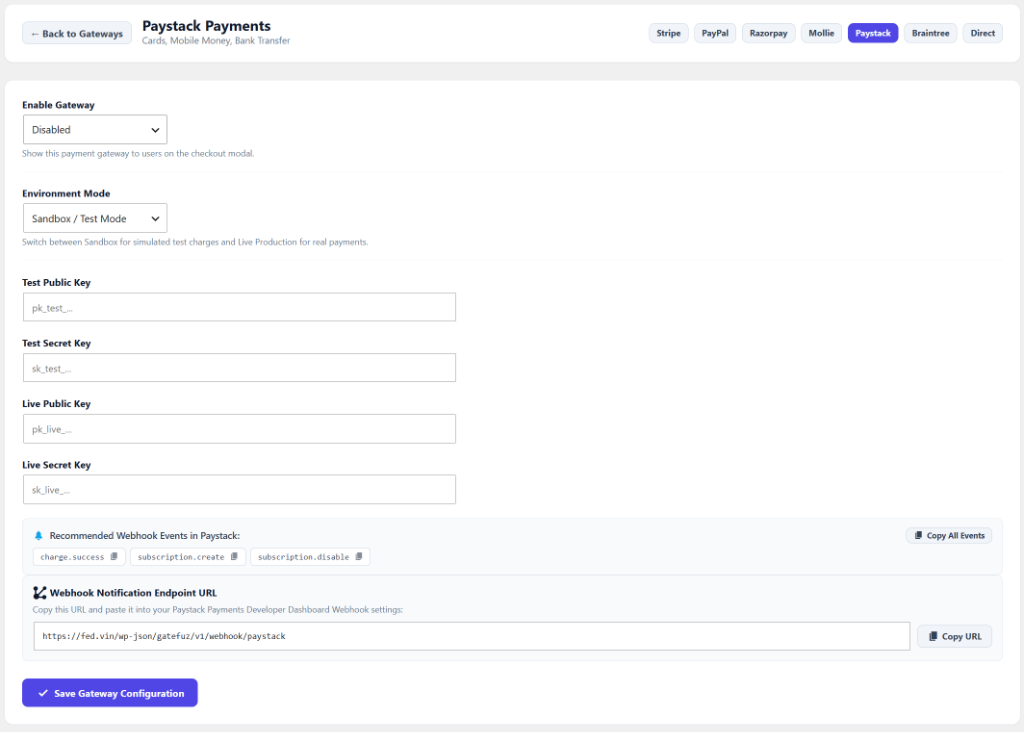
Configuration Fields
Section titled “Configuration Fields”| Setting | Type | Description |
|---|---|---|
| Enable Gateway | Select | Toggle whether Paystack appears in the checkout modal. |
| Environment Mode | Select | Switch between Sandbox / Test Mode and Live Production. |
| Test Public Key | String | Paystack Test Public Key beginning with pk_test_.... |
| Test Secret Key | Password | Paystack Test Secret Key beginning with sk_test_.... |
| Live Public Key | String | Paystack Live Public Key beginning with pk_live_.... |
| Live Secret Key | Password | Paystack Live Secret Key beginning with sk_live_.... |
| Webhook Notification Endpoint | Readonly | Endpoint URL provided in Paystack Dashboard for real-time transaction webhooks. |
Retrieving Paystack API Keys
Section titled “Retrieving Paystack API Keys”- Log in to your Paystack Dashboard.
- Navigate to Settings → API Keys & Webhooks.
- Copy your Test Public Key and Test Secret Key (
pk_test_...andsk_test_...). - Toggle or verify your Live API Keys for production operations (
pk_live_...andsk_live_...). - In WordPress, go to GateFuz → Gateways → Paystack and paste credentials into their respective fields.
Configuring Webhooks & Security
Section titled “Configuring Webhooks & Security”- In the Paystack Dashboard under Settings → API Keys & Webhooks, locate the Webhook URL setting.
- Paste your GateFuz Paystack Webhook URL:
https://example.com/wp-json/gatefuz/v1/webhook/paystack
- Recommended webhook events processed by GateFuz:
charge.successrefund.processedsubscription.createsubscription.disableinvoice.create
- Click Save Changes.
- GateFuz validates incoming Paystack webhook requests using HMAC-SHA512 cryptographic signature verification computed against your secret key (
x-paystack-signatureheader).